
Status
Resolved
Incident
On January 2, 2023, around noon, it was discovered that accessing https://bmf-tech.com/ resulted in slow responses and constant 500 errors. Attempts to log into Grafana for investigation failed.
Considering the possibility that some containers might have gone down for some reason, a deployment was carried out. However, upon confirming the error log no space left on device, another cause was suspected.
Impact
All services of bmf-tech were unavailable.
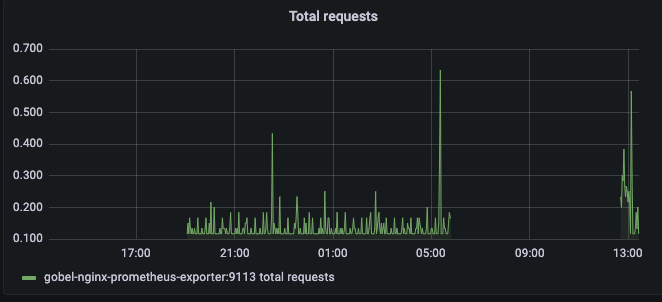
Upon checking the Nginx request status, the service had been down since around 5:48 AM on January 2, 2023.
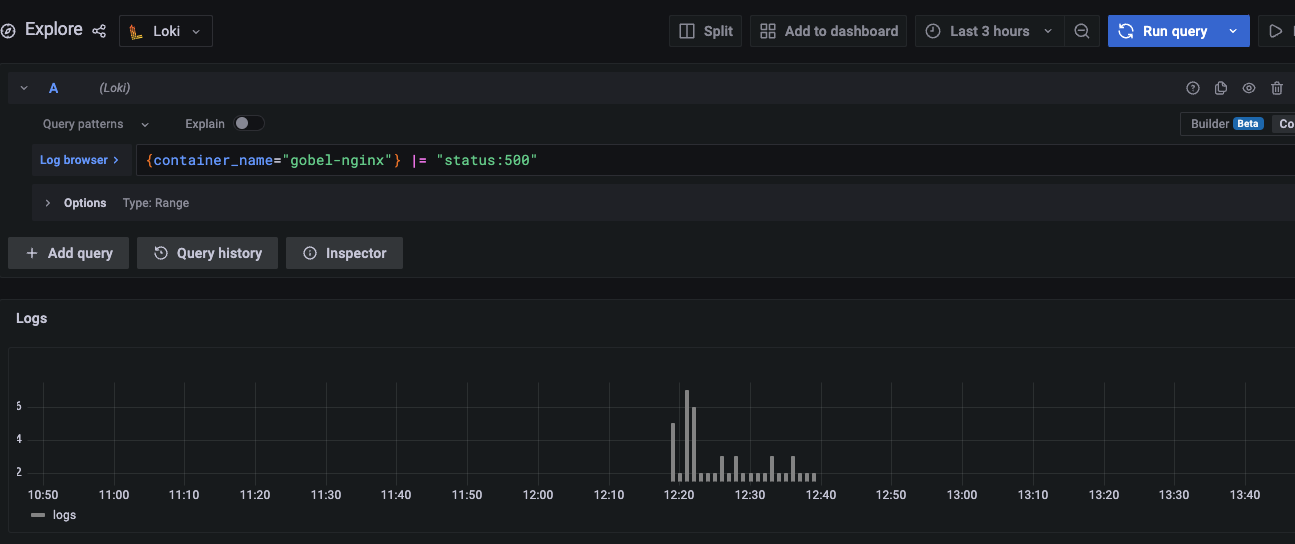
Recovery occurred around 12:40 PM on the same day.
Between 5:48 AM and 12:40 PM on January 2, 2023, 58 instances of 500 errors occurred. Although we wanted to measure a certain number of users, it was difficult to investigate as we had not adjusted to aggregate from logs or GA4, etc.
Cause
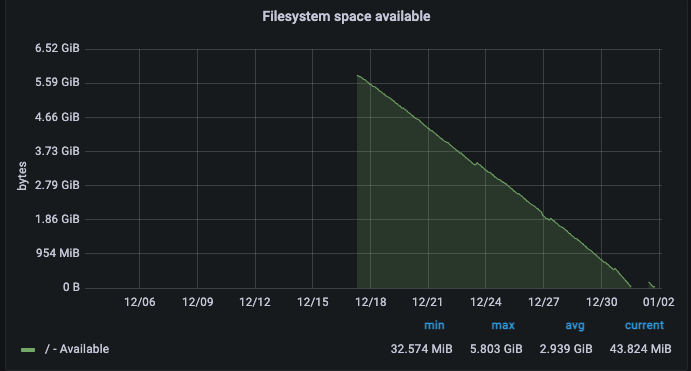
The cause was the lack of free space in the file system.
Response
Deleted data that was consuming file system capacity to secure free space.
Actions
- SSH into the server and check disk free space with the
dfcommand. There was no free space.
df -h
- Investigate the area using the most disk space with the
ducommand. Identified as under/var/lib/docker/.
du -sh /var/lib/docker*
- Delete unused Docker objects to secure free space.
docker system prune -a
- Additionally, deleted journal logs that were consuming the second most space, leaving 200M.
journalctl --vacuum-size=200M
Addendum
The above response was insufficient.
Log files accumulating under /var/lib/docker/containers were taking up significant space, so the container log rotation was adjusted to address this.
ex.
  app:
    container_name: "app"
    logging:
      driver: "json-file"
      options:
        tag: "{{.ImageName}}|{{.Name}}|{{.ImageFullID}}|{{.FullID}}"
        max-size: "10m" // File size to rollover
        max-file: "3" // Number of rollovers before logs are discarded
This response allowed for significant free space. This was the main bottleneck...
Prevention
Added file system usage to alerts to detect and address capacity issues in advance.

Others
We want to identify data that can be deleted or should be rotated to save space.
Thoughts
This was the first incident since replacing bmf-tech.