What We Will Create
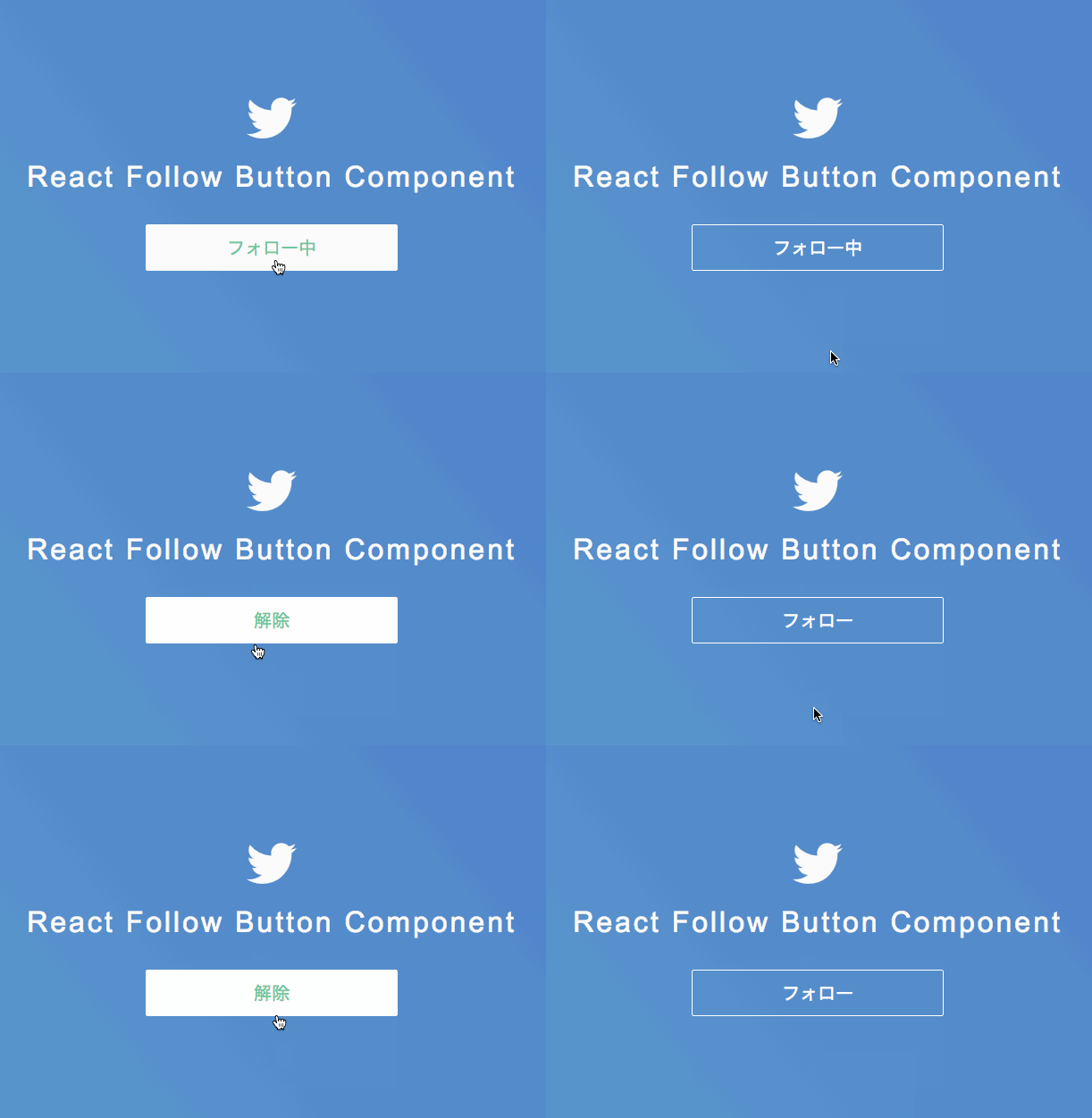
We will create a follow button inspired by Twitter. The specifications are quite similar, but the mechanism is different. The text will toggle between "Follow" and "Following" when clicked, and when hovered over while in the "Following" state, it will display the text "Unfollow". That's all there is to it. There are some unnecessary CSS styles added for decoration, but feel free to adjust the stylesheet as needed.
Required Knowledge
- How to set up React and create simple components
- Some knowledge and understanding of JSX and Babel
Environment
- React ... v15.3.0
- Babel ... Compiler (it seems to compile JSX as well)
Prepare HTML and CSS First
Note: Please adjust the paths as necessary! (I was too lazy to fix it)
<!DOCTYPE html>
<html>
<head>
<meta charset="UTF-8" />
<title>Hello React!</title>
<link href="//netdna.bootstrapcdn.com/font-awesome/4.0.3/css/font-awesome.css" rel="stylesheet">
<link href="style.css" rel="stylesheet">
</head>
    <body>

    <div class="component">

        <p><span><i class="fa fa-twitter fa-4x"></i></span></p>
        <h1>React Follow Button Component</h1>

        <div id="content"></div>

    </div><!-- .component -->


    <!-- scripts -->
    <script src="build/react.js"></script>
    <script src="build/react-dom.js"></script>
    <script src="https://cdnjs.cloudflare.com/ajax/libs/babel-core/5.8.34/browser.min.js"></script>
    <script type="text/babel" src="follow.js"></script>

    </body>
</html>
html {
    height: 100%;
    margin: 0;
    height: 100vh;
}

body {
    color: #F1F1F1;
    font-family: 'Open Sans',Arial,Helvetica Neue,sans-serif;
    min-width: 100%;
    min-height: 100%;
    margin-top: 200px;
    background: linear-gradient(230deg, #a24bcf, #4b79cf, #4bc5cf);
    background-size: 300% 300%;
    /*-webkit-animation: bodyBg 60s ease infinite;
    -moz-animation: bodyBg 60s ease infinite;
    animation: bodyBg 60s ease infinite;*/
}

@-webkit-keyframes bodyBg {
    0%{background-position:0% 84%}
    50%{background-position:100% 16%}
    100%{background-position:0% 84%}
}
@-moz-keyframes bodyBg {
    0%{background-position:0% 84%}
    50%{background-position:100% 16%}
    100%{background-position:0% 84%}
}
@keyframes bodyBg {
    0%{background-position:0% 84%}
    50%{background-position:100% 16%}
    100%{background-position:0% 84%}
}

.component {
    text-align: center;
}

h1 {
    line-height: 0.8;
    letter-spacing: 3px;
    font-weight: 300;
    text-align: center;
    margin-bottom: 40px;
}

/*
Follow Button
 */
.follow-button {
    display: block;
    margin: 0 auto;
    width: 200px;
    color: white;
    font-size: 20px;
    padding: 10px 40px 10px 40px;
    border: solid white 1px;
    border-radius: 2px;
    cursor: pointer;
}

.follow-button:hover {
    transition: .3s;
    color: #43cea2;
    background-color: white;
}
We will generate the follow button component inside the div with the id "content". The CSS class "follow-button" is the style for the generated follow button. (If you just want to check the behavior, you can skip the CSS.)
Creating the Follow Button Component
var FollowButton = React.createClass({
    getInitialState: function () {
        return {
            value: "Follow",
            toggle: false
        };
    },

    handleClick: function () {
        if (this.state.toggle) {
            this.setState({
                value: "Follow",
                toggle: false
            });
        } else {
            this.setState({
                value: "Following",
                toggle: true
            });
        };
    },

    handleMouseOver: function () {
        if (this.state.toggle) {
            this.setState({
                value: "Unfollow",
            });
        };
    },

    handleMouseOut: function () {
        if (this.state.toggle) {
            this.setState({
                value: "Following",
            });
        };
    },

    render: function () {
        return (
            <span className="follow-button" onClick={this.handleClick} onMouseOver={this.handleMouseOver} onMouseOut={this.handleMouseOut}>
                {this.state.value}
            </span>
        );
    },

});

ReactDOM.render(
    <FollowButton />,
    document.getElementById('content')
);
Thoughts
It seems I still need more practice to create components on par with React tutorials (:3」∠)
References
- If you want to dynamically add and remove classes in React, JedWatson's classnames is convenient
- Beginner's Guide to React with Code Examples ... A recommended resource to learn React step by step!




